

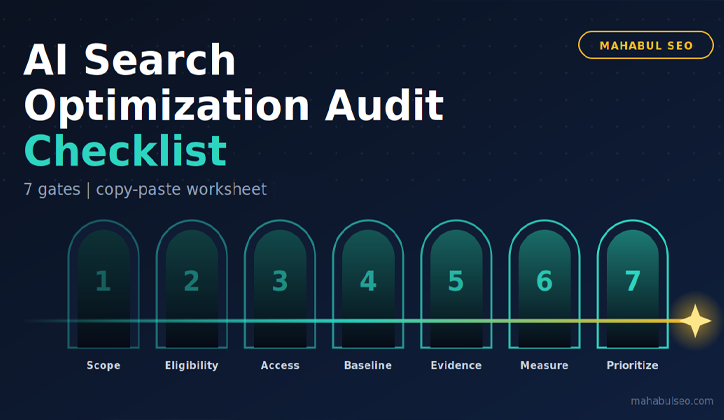
An AI search optimization audit checks whether search systems can reach your pages, whether AI answers mention and describe your business correctly, and whether any of that produces enquiries. This guide gives you the order to check things in, a copy-paste worksheet, a sample prompt set and exact steps for Google, ChatGPT Search, Bing and GA4, so you can run the audit yourself this week.
What Is an AI Search Optimization Audit?
An AI search optimization audit is a structured check of four things: technical eligibility, observed AI visibility, content and evidence quality, and business outcomes. Treat them as four separate results, not one score.
It is not a ranking guarantee, a proprietary AI score or a 100-point list of tricks. Google states that optimizing for generative AI search is, from its perspective, still SEO, and it lists several popular tactics it does not use covered near the end of this guide.
What Should You Check First?
An AI search audit can uncover dozens of possible issues. However, investigating everything at once can waste time and make it difficult to identify the changes that matter most.
- Scope: what you sell, to whom, where, and who you really compete with.
- Eligibility: your key pages are indexed and snippet-eligible, and your Search generative AI control is set to include your site.
- Access: robots.txt, firewall, CDN and server responses allow the crawlers you want.
- Baseline: what AI platforms currently say about you for real buyer questions, recorded in a worksheet.
- Evidence and measurement: whether your pages and outside sources support the answers, and whether you can measure results.
That is why a useful audit separates technical eligibility, observed visibility, content and evidence quality, and business outcomes rather than treating them as one score.
The 7-Gate AI Search Audit
This is the process used in the rest of the guide. Move to the next gate only after the current one passes or you have logged the issue.
| Gate | Question it answers | Pass when | Effort for a small site (estimate) |
|---|---|---|---|
| 1. Scope | What are we testing, for whom? | Business brief, 3-5 competitors and 10-20 prompts written | 30 min |
| 2. Eligibility | Can key pages be shown at all? | Indexed, snippet-eligible, AI control set to include | 45 min |
| 3. Access | Can crawlers actually fetch them? | No blocks in robots.txt, firewall or server responses | 1-2 hr |
| 4. Baseline | What do AI answers say now? | Dated worksheet with repeat runs | 2-3 hr |
| 5. Evidence | Do pages and outside sources support us? | Gaps in content, facts and sources listed | 2-4 hr |
| 6. Measurement | Can we see results? | Official reports and tracking set up | 1-2 hr |
| 7. Prioritize | What do we fix first? | Scored action list with owners and recheck dates | 1 hr |
Gate 1: Scope – Business Brief, Competitors, Prompts
Write the brief before you test anything, or you will test the wrong questions.
| Field | What to write |
|---|---|
| Offer | The 3-5 services or product groups that earn revenue |
| Customer | Who buys, and what triggers the search |
| Market | Cities, regions or countries you serve |
| Differentiator | One concrete thing you do differently |
| Competitors | 3-5 businesses customers genuinely compare you with not just sites that share keywords |
| Goal | Enquiries, calls, sales or bookings you want from search |
Build a prompt set from real questions
Pull questions from sales calls, enquiry forms, Search Console queries and on-site search. Cover the whole buying journey. Use 10-20 prompts for a first audit a practical starting size, not a statistical sample.
| Stage | Prompt template |
|---|---|
| Discover | “What should I look for when choosing a [service] provider in [city]?” |
| Problem | “Why is my [problem] happening and who can fix it?” |
| Compare | “[Service] near me: how do I compare providers?” |
| Price | “How much does [service] cost in [city]?” |
| Trust | “Is [your brand] a good [service type]?” |
| Brand | “What does [your brand] offer?” |
| Decision | “Which [service] provider in [city] should I hire for [specific need]?” |
Lock the list for at least one quarter so later checks stay comparable.
Gate 2: Eligibility – Google, Bing, ChatGPT
A page can only appear if the platform can index it and you have not opted out.
Google (AI Overviews and AI Mode):
- In Search Console, run URL Inspection on your homepage, main service or category pages and your best articles. Confirm each is indexed and crawlable.
- Check there is no
noindex,nosnippetor restrictivemax-snippetrule on pages you want shown. Google lists these as the controls that limit what appears. - Open Settings > Search generative AI and confirm your property is set to include your site. This is the default, but a past change or parent property can override it. See Google’s Search generative AI control.
Google’s own wording: a page must be indexed and eligible to appear with a snippet, and there are no extra technical requirements beyond that AI features and your website. Meeting them does not guarantee inclusion.
Bing and Copilot: verify your site in Bing Webmaster Tools (importing from Search Console is the fast route) so you can see the AI Performance report in Gate 6.
ChatGPT Search: eligibility depends on OAI-SearchBot access (Gate 3).
Gate 3: Access – Crawlers, Firewall, Rendering
Content improvements will not resolve every visibility problem. First, establish whether search systems can access and process your important pages.
robots.txt is only one of four places a crawler can be blocked.
| Layer | What to check |
|---|---|
| robots.txt | Are key sections disallowed for the crawlers you care about? |
| Firewall, CDN, bot protection | Do legitimate crawlers get 403, 429, challenge pages or timeouts? |
| Server and redirects | 5xx errors, redirect loops, slow responses |
| Rendering | Is the important text in the rendered page, not only in images, PDFs or scripts that fail to load? |
ChatGPT Crawlers: Three Different Jobs
Per OpenAI’s crawler documentation:
| User agent | Purpose | Controls |
|---|---|---|
| OAI-SearchBot | Surfaces sites in ChatGPT search results | Allow it to be eligible; sites opted out are not shown in ChatGPT search answers |
| GPTBot | Crawls content that may train foundation models | Independent of OAI-SearchBot |
| ChatGPT-User | Visits triggered by a user action | Not used for automatic crawling or for deciding Search inclusion; robots.txt may not apply |
Example robots.txt. The GPTBot line is a business decision, not a recommendation:
User-agent: OAI-SearchBot
Allow: /

# Optional: opt out of model training only
User-agent: GPTBot
Disallow: /
OpenAI recommends also allowing its published IP ranges at your firewall, and notes robots.txt changes can take about 24 hours to take effect. Verify crawler identity using OpenAI’s published IP lists, not just the user-agent text. Do not weaken security broadly; ask your developer for targeted rules.
Google-Extended is a separate control for limiting training and grounding in some other Google systems. It does not control AI Overviews or AI Mode in Search.
Gate 4: Baseline – What AI Platforms Say Today
Run your prompt set on the platforms your buyers use, repeat each prompt, and record everything in a worksheet.
Rules that keep the data usable:
- Same exact wording every time. Record platform, mode, date, location and whether you were signed in.
- Run each prompt at least 3 times on different occasions. Answers change by time, wording and context.
- Save the answer or a screenshot, and open every cited link.
- Log mention, recommendation and citation as three separate fields.
Copy-paste worksheet: AI Visibility Baseline
| ID | Date | Platform and mode | Exact prompt | Run | Mentioned? | Recommended? | Your URL cited? | Description accurate? | Competitors shown | Top cited sources | Notes |
|---|---|---|---|---|---|---|---|---|---|---|---|
| P01 | 1 | Y/N | Y/N | Y/N + URL | Y / Partial / N | ||||||
| P01 | 2 | ||||||||||
| P01 | 3 |
How to read the baseline
| Pattern | Likely meaning | Next action |
|---|---|---|
| Never mentioned, key pages not indexed | Eligibility problem | Fix Gates 2-3 first |
| Never mentioned, pages indexed and open | Visibility or evidence gap | Compare cited sources (Gate 5) |
| Mentioned, description wrong | Outdated or conflicting facts | Fix sources you control; log the rest |
| Competitor cited with a page type you lack | Content gap | Build or improve the matching page |
| Cited, but no traffic | Citation without clicks is common | Check Gate 6 data before changing anything |
| Results flip between runs | Normal variation | Judge by the pattern across runs, not one answer |
Gate 5: Evidence – Content, Brand Facts, Sources
AI features rely on the same helpful-content and quality systems as Google Search, so the question is whether your pages contain something worth citing.
The non-commodity test
Google separates commodity content common knowledge anyone could summarize from non-commodity content first-hand experience, original data, a distinct point of view. For each priority page ask: could this be written by summarizing the top five results? If yes, add what only you have.
| Add this | Example |
|---|---|
| First-hand process | Your actual steps, tools and screenshots |
| Original data | Counts from your own audits or customer enquiries |
| Real examples | Anonymized case with what changed and what happened |
| Decision help | Costs, trade-offs, who it is not for |
Page evidence checklist – service, product or article
| Check | Pass when |
|---|---|
| Answers the buyer question | The first lines answer it; details follow |
| Specific and supported | Claims name a source, example or limit |
| Clear offer | Who it is for, what is included, process, next step |
| Up to date | Dates, prices and statistics are current |
| Not duplicated | No second page chasing the same intent |
| Internally linked | Reachable from navigation and related pages |
| Author and company clear | Real author, About page, contact details |
Do not create a separate page for every possible prompt or fan-out query. Google warns that doing this to manipulate AI responses can break its scaled content abuse policy.
Brand facts check
| Fact | Source of truth | Compare against |
|---|---|---|
| Name, address, phone | Your website footer and contact page | Google Business Profile, Bing Places, directories |
| Services and areas | Service pages | Profiles and listings |
| Product data (ecommerce) | Product pages and feed | Merchant Center |
| Founder and credentials | About page | Social and professional profiles |
Google also lists keeping Merchant Center and Business Profile information current as part of AI-feature best practice.
Source analysis
For every prompt where you were missing or wrong, open the cited pages and ask: does it support the claim, is it current, is it independent, and what does it contain that yours does not? Look for patterns across several prompts before drawing conclusions. Genuine mentions and reviews can help context; seeking inauthentic mentions is not recommended by Google.
Gate 6: Measurement – Official Reports First
Use the platforms’ own reports before guessing from analytics.
| Source | Shows | Does not show |
|---|---|---|
| Search Console Generative AI performance report | Impressions from AI Overviews and AI Mode by page, country and device | Your answer text or prompts |
| Search Console Performance (Web) | Clicks and impressions across Google Search | A clean split of AI clicks |
| Bing Webmaster Tools AI Performance | Citations in Copilot and Bing AI summaries, grounding queries, cited pages | Clicks or traffic; ChatGPT |
| GA4 | Visits with identifiable AI referrers, landing pages, key events | Visits with no referrer; Google AI-feature clicks as a separate channel |
| CRM or lead sheet | Real enquiries and sales | Where the user first saw you |
The Generative AI performance report appears once your site has enough impressions and requires your site to be included in the generative AI control.
Set up an AI channel in GA4
- Go to Admin > Data display > Channel groups and create a new channel group.
- Add a channel named “AI assistants”.
- Condition: Source matches regex
chatgpt\\.com|chat\\.openai\\.com|perplexity\\.ai|claude\\.ai|gemini\\.google\\.com|copilot\\.microsoft\\.com. - Match on Source only. Practitioners report ChatGPT adds
utm_source=chatgpt.comto some links, and these visits can appear without a normal referral medium. Verify this in your own data. - Move the channel above Referral so it takes priority.
- Review Reports > Engagement > Landing page with the channel as a secondary dimension (GA4 Landing page report).
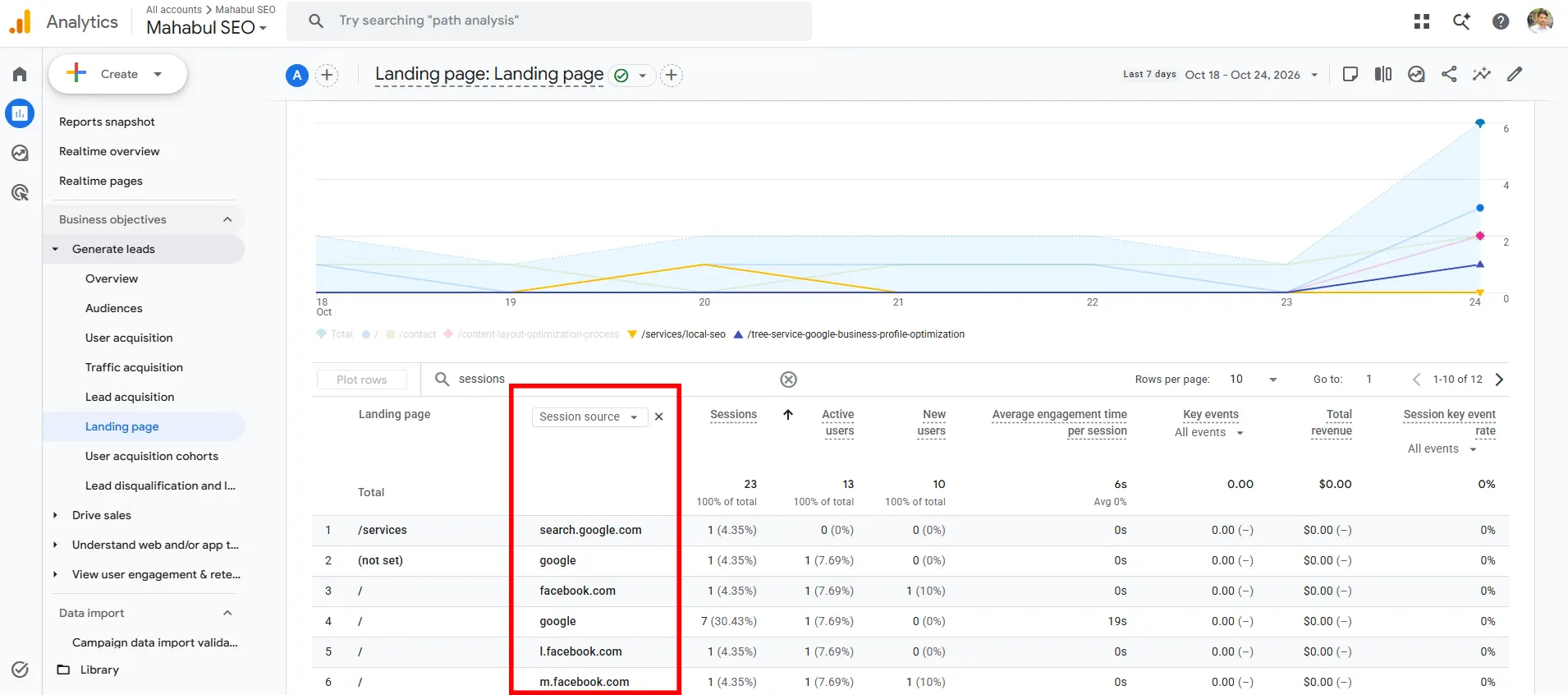
Treat the result as a floor. Some AI visits arrive with no referrer, and Google AI-feature clicks are counted within Google Search traffic.
Track what matters
Set up key events for form submissions, calls and WhatsApp clicks, then compare them with real enquiries in your inbox or CRM. A click is not a lead.
Gate 7: Prioritize and Recheck
Fix blockers first, then high-value pages, then everything else. Use this planning score “a practical method, not a Google or AI-platform formula”.
| Factor | 1 | 2 | 3 |
|---|---|---|---|
| Business impact | Low | Medium | High |
| Evidence confidence | Guess | Likely | Verified |
| Urgency | Can wait | Soon | Blocks other work |
Add the three numbers for a score out of 9. Work from the top down.
Copy-paste worksheet: Action Log
| Issue | Evidence (URL or screenshot) | Impact | Confidence | Urgency | Score | Fix | Owner | Due | Recheck date | Result |
|---|---|---|---|---|---|---|---|---|---|---|
| 1-3 | 1-3 | 1-3 | /9 |
Fix order:
- confirmed access or indexing blockers
- wrong facts about your business on sources you control
- missing or weak pages for high-value questions
- tracking gaps
- supporting content
Recheck: after a fix, repeat only the affected checks and the related prompts, then compare with your baseline. Re-run the full prompt set quarterly or after major site changes.
What Does Not Work And What Google Says to Ignore
Several popular tactics are unsupported for Google Search. Google’s guide on optimizing for generative AI says:
| Tactic | What Google says |
|---|---|
| llms.txt and special AI files | Google Search does not use them. Creating them neither helps nor harms Google visibility |
| Chopping content into tiny “chunks” | Not required; there is no ideal page length |
| Rewriting content only for AI | Not needed; systems understand synonyms and meaning |
| Seeking inauthentic mentions | Not effective; core ranking and spam systems still apply |
| Over-focusing on schema | Not required for AI search; no special markup exists |
| Trusting third-party tools that claim “internal Google metrics” | No third-party tool has access to Google’s internal ranking or AI systems |
Other platforms may behave differently, so test your own results instead of copying rules between systems.
Real Audit Example
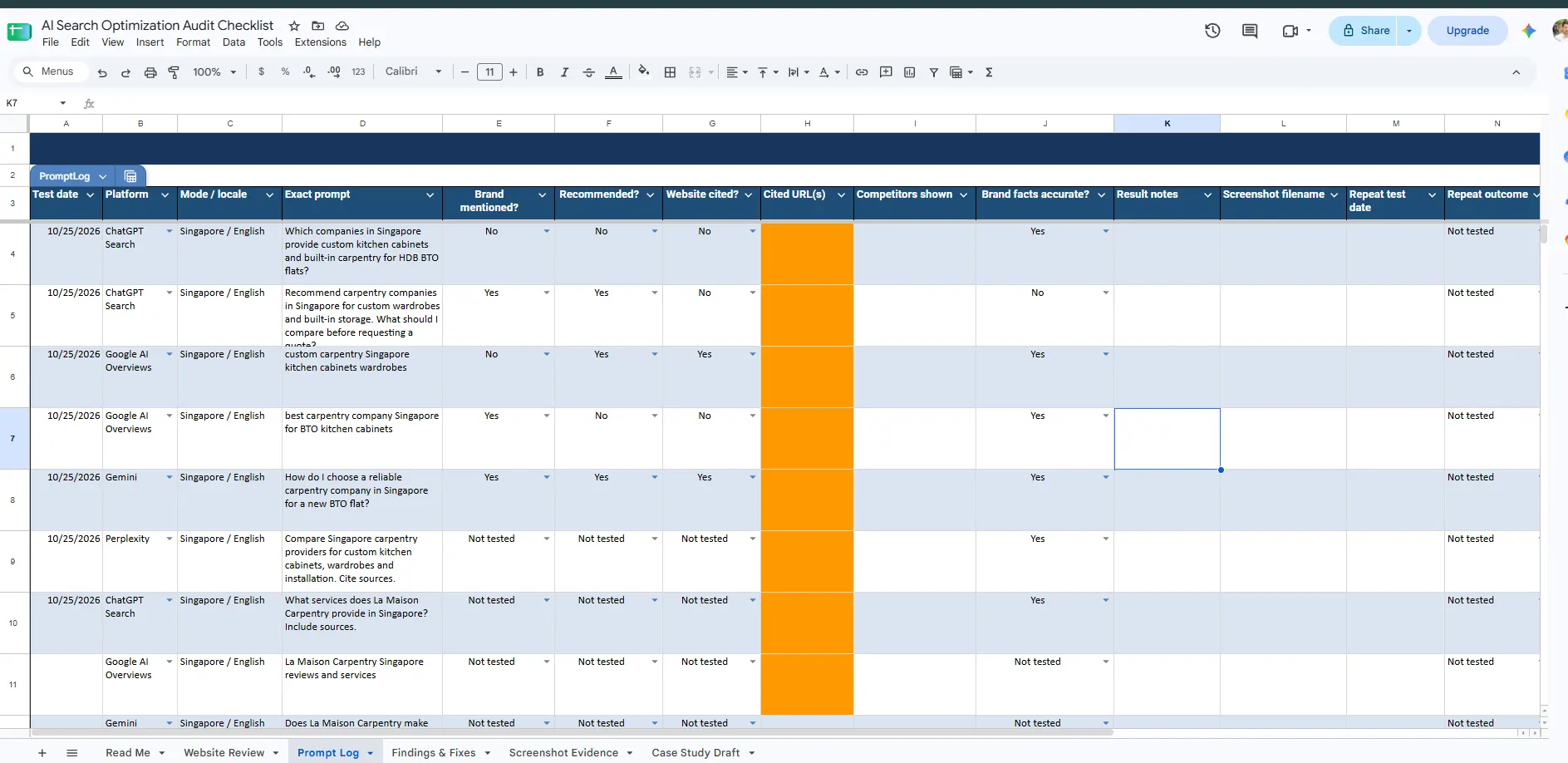
Free AI Search Audit Spreadsheet
Want to track your brand’s visibility across AI search platforms? Use this spreadsheet to record AI-generated recommendations, brand mentions, citations, and optimisation opportunities.
Make your own copy before editing the spreadsheet so the original template remains unchanged.
Should You Run the Audit Yourself or Hire Help?
You can run Gates 1-4 yourself with Search Console, a spreadsheet and the AI tools your buyers use. Hire help when you face recurring crawl or rendering issues, conflicting brand data across many sources, unclear competitor patterns, or unreliable conversion tracking.
Ask any consultant: what evidence will you show me, who owns the accounts, how will you report results, and what do you refuse to promise? Walk away from guaranteed citations or an unexplained proprietary score. If you want to audite.
Want to identify the AI search issues worth fixing first? Explore Mahabul SEO’s AI Search Optimization Services to learn how an audit can help establish priorities for your business.
FAQs about AI Search Optimization Audit Checklist
What is included in an AI search optimization audit?
A good audit covers eligibility, crawler access, an AI visibility baseline, content and evidence quality, brand facts, measurement and a prioritized action list. It should end with evidence-backed fixes, not just a score.
How often should you run an AI search audit?
Run a full baseline once, recheck affected items after each change, and repeat the full prompt set quarterly. Increase frequency during major site or market changes.
Which tools do you need?
Search Console, Bing Webmaster Tools, GA4 and a spreadsheet are enough for a first audit. Add paid monitoring only if you need scale, and treat its numbers as estimates.
Does an audit guarantee AI citations?
No. It finds blockers and gaps and shows whether fixes help. Answers vary by platform, query and time.
Is AI search optimization different from SEO?
They overlap heavily. For Google, the foundations are the same: indexable, helpful, original content. The added work is testing how AI platforms describe you and measuring those journeys.
Do I need llms.txt or special schema?
Not for Google Search. Google says it does not use llms.txt and that no special schema is needed. Use structured data only where it accurately matches visible content.
Can I see AI Overviews traffic in Search Console?
Yes, as impressions in the Generative AI performance report and within overall Web search data. It does not appear as a separate AI channel in GA4.
How many prompts should I test?
Start with 10-20 well-chosen buyer questions, each run at least three times. Expand once you know which journeys matter.
Final Thoughts
The most useful AI search audit is simple: confirm your pages can be reached, record what AI platforms say with a repeatable worksheet, fix verified problems in priority order, and measure with official reports plus your own enquiries. Start with Gate 2 today, because an excluded setting or a blocked crawler costs more than any content tweak.
Request an AI Search Visibility Audit
I will run your prompt set across the platforms your buyers use, check eligibility and access, and send back 10 evidence-backed fixes in priority order.
Request an AI Search Visibility Audit . See my AI Search Optimization service
About the Author
Mahabul Islam is an independent SEO consultant who helps local and ecommerce businesses with Local SEO, technical SEO, semantic SEO and AI search optimization (AEO and GEO). He works with clients in the US, UK, Singapore, Ireland and UAE and has worked in SEO since 2023.