

Most ecommerce stores spend months on category pages and backlinks, then paste the manufacturer’s description into a product page and wonder why it never ranks. Product pages are where search traffic turns into revenue, so they deserve a proper process.
This guide walks through that process step by step, using Google’s current documentation and the most recent changes to Google’s product guidelines. You will get title and H1 formulas, a method for writing descriptions that are not copied, image rules, trust elements, internal linking and product schema, plus a before/after example and a checklist you can apply to your own store today.
What a Product Page Must Answer
Google’s guidance on helpful content comes down to one idea: create pages for people first, not for search engines. For a product page, that means answering the questions a shopper has before they buy. If your page cannot answer them, a competitor’s page will.
A good product page answers six questions quickly:
- What is it? Clear product name, brand, model and key specifications.
- Is it right for me? Sizes, materials, compatibility, who it is for and who it is not for.
- What does it cost? Price, discounts and the real final cost including shipping.
- Can I trust this store? Reviews, return policy, contact details and secure checkout.
- When will it arrive? Delivery times, stock status and shipping costs.
- What if it does not work out? A visible, plain-language return and warranty policy.
Working out what a shopper expects to see before you write anything is search intent in practice, and my guide to search intent optimization shows how to do it. The rest of this guide is about showing those answers to shoppers and to Google in a way both can understand.
Title Tag and H1 Formulas
Your title tag is still one of the strongest on-page signals you control. Google builds the clickable title in search results, called the title link, from several sources: the title element, the main visible heading on the page, and other signals. Google can and does replace titles. A large Ahrefs study of roughly 950,000 pages found that Google rewrites about a third of title tags, and that overly long titles are more likely to be rewritten. The practical lesson is to write a clear, concise title that already matches what is on the page.
A simple formula for product titles
[Product Name] + [Most Important Attribute] | [Brand or Store]
Rules to follow
- Make every title unique. Google specifically advises against repeating the same title across pages.
- Put the product name and main search term first.
- Aim for roughly 50 to 60 characters so the title is less likely to be cut off or rewritten.
- Add one useful attribute (material, size, key feature or use), not a list of keywords.
- Do not stuff keywords or add words like “buy now cheap best”.
- Keep your H1 almost identical to the title. When the H1 and title agree, Google has less reason to replace either of them.
Meta description
Google does not use the meta description as a ranking factor, and it frequently writes its own snippet from page content. Still, a good unique description can be used and helps earn the click. Write 120 to 155 characters that mention the product, one benefit and one trust point such as free returns or delivery time.
Before and after
| Before | After | |
|---|---|---|
| Title tag | Product 28473 – Black Leather Wallet | Slim Black Leather Wallet, RFID Blocking | YourStore |
| H1 | Black Leather Wallet | Slim Black Leather Wallet with RFID Protection |
| Meta description | Buy black leather wallet online. | Full-grain leather slim wallet that holds 8 cards. RFID blocking, free returns within 30 days. |
The “after” version names the product, a distinguishing feature and a reason to click, and it is unique to this one product.
Product Descriptions That Are Not Copied
If your product description is the same text the manufacturer supplies to every reseller, you have nothing that sets your page apart. Google’s spam policies target scraped content and pages that add little value on top of material copied from elsewhere, and even when copied text is not penalised, identical pages simply have no reason to outrank each other.
A method for writing original descriptions
- Open with the buyer’s problem or use case, not the specification sheet. This is the same idea I explain in how to write answer-first content. “A slim wallet for people who carry cards and cash but hate bulk” beats “Wallet, black, leather”.
- Describe benefits and then prove them with specifications. Show materials, dimensions, weight, capacity and compatibility in a short table, because shoppers scan.
- Add what only you can add: sizing advice, care instructions, what is in the box, how it compares with a similar item in your store, honest limitations.
- Use the words customers use. Pull phrases from reviews, support emails and the questions people ask in chat, and use semantic keyword research to find the related terms shoppers use for the same product.
- Keep one idea per paragraph and break the text with short headings or bullets.
How long should it be? There is no magic word count. Simple products often need 150 to 300 words plus a specification table. Complex or expensive products need more because the buyer has more questions. Write until the questions are answered, then stop.
Variants: for the same product in different colours or sizes, either use one page with selectable variants or make each variant page meaningfully different. Do not publish dozens of near-identical pages.
Images, Alt Text and File Names
Google’s image guidance is clear and has not changed in spirit: help Google find your images, then give it good context about what each image shows.
- Use real HTML images. Put images in standard
<img>elements so Google can discover and index them, and keep them on the product page itself rather than only in a script-loaded gallery. - Use short, descriptive file names. Google’s own example is that a name like my-new-black-kitten.jpg is better than IMG00023.JPG. For products, that looks like slim-black-leather-wallet-front.jpg. Use hyphens, not spaces or underscores.
- Write unique alt text for every image. Google uses alt text together with computer vision and the surrounding page content to understand an image. Describe what that specific image shows, in plain language, and include variant or angle information. Never stuff keywords.
- Show the product properly. Include multiple angles, a close-up of detail, a scale reference and an in-use photo. Real photos usually build more trust than only manufacturer renders.
- Compress and serve responsive sizes. Heavy images hurt page speed and Core Web Vitals, which affect user experience. Use modern formats such as WebP or AVIF and sensible dimensions, and avoid lazy-loading the main product image that appears first on screen.
- Add captions when they help, because Google also draws context from text near the image.
Alt text examples
| Weak | Better |
|---|---|
| wallet | Slim black leather wallet shown open with eight cards inside |
| IMG_4471 | Close-up of stitched edge on black leather wallet |
| best leather wallet buy leather wallet cheap | Black leather wallet on desk next to a phone for size comparison |
Decorative images that add no information can use an empty alt attribute so screen readers skip them. Alt text is also an accessibility feature, so write it for people first.
Reviews and Trust Elements
Reviews do two jobs. They help shoppers decide, and they put fresh, unique, customer-written content on your page. Google does not publish a statement that reviews are a direct ranking factor, so treat them as a conversion and content-quality asset that supports your SEO rather than a ranking trick.
Follow these rules:
- Show real reviews on the page itself, in HTML that Google can read, not only in an embedded widget that does not render.
- Only mark up reviews and ratings that are visible to users and that are genuinely about that product. Google’s review snippet guidelines require ratings in markup to reflect real user reviews and to match the content on the page.
- Never write or buy reviews. It breaks Google’s policies and damages trust.
- Answer questions on the page. A short Q&A section reduces uncertainty and brings in the exact wording customers search for.
Trust elements that belong on every product page:
- A clear return and refund policy, linked from the page
- Delivery times and costs
- Warranty or guarantee details
- Secure payment badges, only for services you really use
- A visible way to contact you
Google can also use return policy and shipping details in merchant listing experiences, so these are not just conversion elements. They can be supplied in structured data too.
Internal Links from Categories and Guides
A product page with no internal links is hard for Google to find and gives it no context. Build links in three directions:
- From category pages to products. Your category page is the main doorway to each product, so make sure the important products are linked in normal crawlable
<a href>links. See my guide to ecommerce category page SEO for how to structure this. - From guides and blog posts to products. If you publish a buying guide or a how-to, link naturally to the products it recommends using descriptive anchor text such as “slim leather wallet” rather than “click here”.
- Between related products. “Related products”, “frequently bought together” and “compare with” blocks keep shoppers moving and give Google a clear picture of how your catalogue fits together.
Add breadcrumbs (Home > Category > Product) so the hierarchy is clear to both users and search engines, and make sure no live product page is an orphan with zero internal links.
If you want to understand how all these pieces fit into a full store strategy, read my ecommerce SEO guide.
Product Schema (Structured Data)
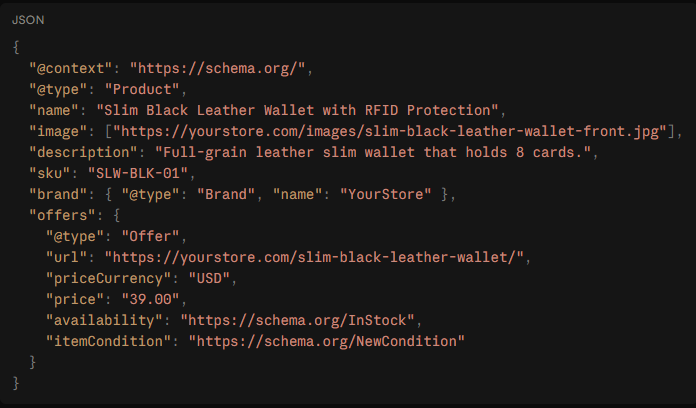
Product structured data helps Google understand price, availability, ratings and product identity. Google supports two related experiences. Product snippets can show details such as ratings and price in results, and accept an Offer or an AggregateOffer. Merchant listings are for pages where shoppers can buy directly, and they require an Offer because the merchant must be the seller. If you sell your own products, aim for merchant-listing eligibility.
Here is a minimal JSON-LD example for a product page:
What is new in 2026
- On July 7, 2026, Google updated its merchant listing documentation to add support for the
Product.categoryproperty, which can carry plain text or a category code, and a new section on sale duration so you can state the dates a sale price applies. These bring on-page markup closer to what you can already send in a Merchant Center feed. - Google recommends using both on-page structured data and a Merchant Center feed, because together they maximise eligibility and help Google verify your product data.
- Keep prices, availability and sale dates in markup identical to what is visible on the page and in your feed. Mismatches are a common cause of errors. If there is no sale running, leave out the sale dates instead of leaving old ones in the code.
- Google has said there is no special structured data required for AI Overviews or AI Mode, so do not chase an “AI schema”. Accurate product data helps in regular Search and shopping surfaces, which AI features also draw on. For the bigger picture, see my AI search optimization guide.
How to check your work: test pages with Google’s Rich Results Test, then monitor the Merchant listings and Product snippets reports in Search Console.
For a wider look at structured data beyond products, read my schema markup guide.
Product Page SEO Checklist
Use this on every product template and on your top 20 products first.
- Unique title tag (around 50 to 60 characters) with product name and one key attribute
- H1 matches the title closely and appears once
- Unique meta description with a benefit and a trust point
- Original description with specifications table, not manufacturer text
- Descriptive file names and unique alt text on every image
- Compressed, responsive images; main image not lazy-loaded
- Real customer reviews visible in HTML
- Return, shipping and warranty information visible
- Linked from its category page and at least one guide or related product
- Breadcrumbs in place
- Product schema with Offer, matching visible price and availability
- Merchant Center feed consistent with the page
- Page passes Rich Results Test with no errors
FAQs about Product Page SEO
Should I rewrite manufacturer descriptions?
Yes, at least for your most important products. Identical text used by many sellers gives Google no reason to prefer your page. Rewrite starting with your best sellers and highest-margin items, add specifications, sizing advice and real-use details, and keep going down the catalogue over time.
How long should a product description be?
There is no required length. Aim to answer every question a buyer would ask. Simple products can work well with 150 to 300 words and a spec table, while technical or high-priced items need more depth.
Do product reviews help SEO?
Reviews are not a confirmed direct ranking factor, but they help in practical ways. They add unique content, they can make eligible results more attractive when marked up correctly, and they raise conversion rates. Keep them genuine and visible on the page.
A Note on FAQ Schema
Google stopped showing FAQ rich results in Search on May 7, 2026. FAQPage remains a valid schema.org type and you do not have to remove it, but it will not create a visible search feature. Keep an FAQ section on your page because it helps shoppers, and treat the markup as optional.
Next Step
If you would like an expert to check your title tags, descriptions, images and schema across your store, request my free ecommerce SEO audit and I will show you the quickest fixes for your product pages. Contact me here to get started, or see how I work on ecommerce SEO services and in my case studies.
Sources: Google Search Central: image SEO best practices | Google Search Central: merchant listing structured data | Search Engine Journal: Google drops FAQ rich results